 Floater
 › Focus timer for ADHD
A focus timer for ADHD that doesn't make you feel bad
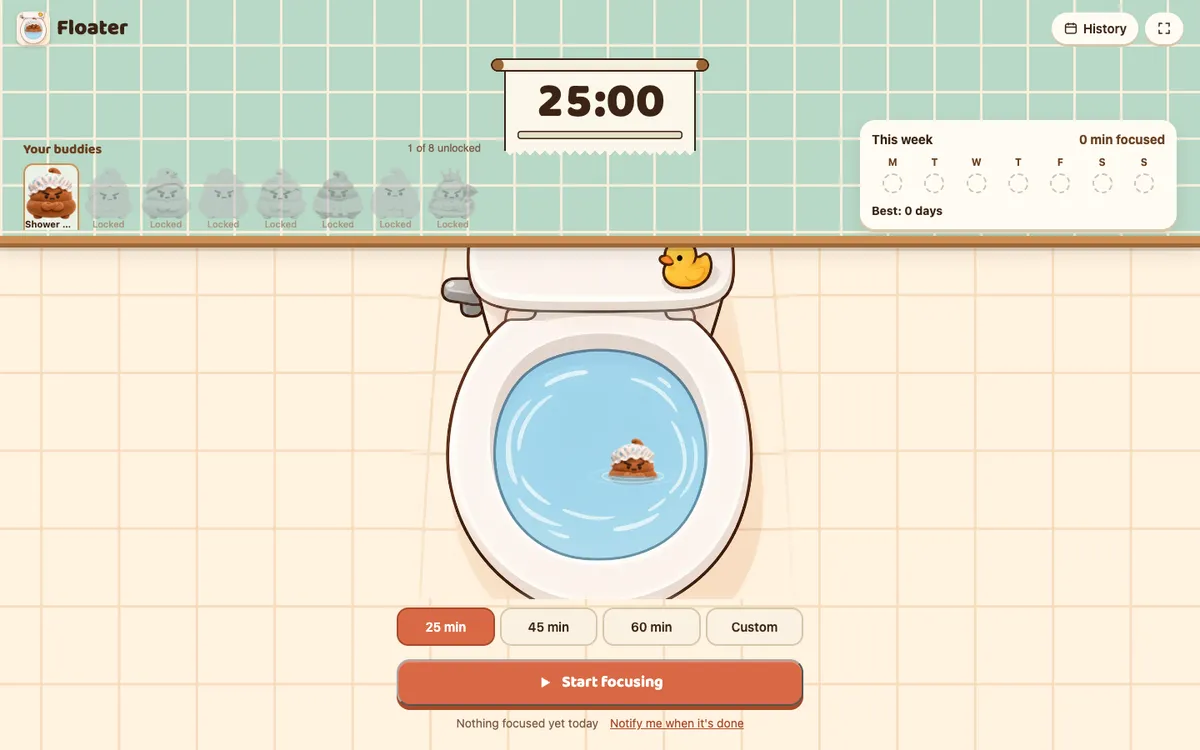
Short answer: the focus timers that tend to work for ADHD are visual (you can see progress), need no setup (one tap and you're in), let you pick a length you can actually finish, and don't punish you when you stop early. Floater does all four. Its web timer is free in any browser, and the iPhone app is US$2.99 one time.
Why a plain 25-minute timer often doesn't stick
Lots of people with ADHD say they've "tried every focus timer" and dropped each one after a week. The same problems come up again and again:
- Starting is the hard part. If a timer asks you to set up tasks, tags and goals first, the moment has passed.
- Time is invisible. A number counting down is easy to ignore. Something you can see changing is harder to tune out.
- 25 minutes is someone else's number. Some days 10 minutes is a win; other days you hyperfocus for an hour and a forced break throws you off.
- Failing feels personal. A dead plant or a red "failed" badge adds to the shame many people with ADHD already carry about "simple things".
- The phone is right there. One notification and the session is over.
The Pomodoro Technique, with focus blocks and short breaks, is a good idea. It just works better when the timer bends to you.
What to look for in an ADHD-friendly timer
| What helps | How Floater does it |
|---|---|
| Visual progress | Your buddy floats in the toilet and grows through four stages (Nugget → Swirl → Big Swirl → Royal Swirl). A paper-roll timer and a row of 12 tiles fill up as you go. |
| No setup | Open it, tap Start focusing. No account, no quiz, no task list. |
| Lengths you can win | 25, 45 or 60 minutes, or anything from 5 to 180. After a session you can skip the break and keep going. |
| Gentle failure | Quit early and your buddy splats. "Want another go?" No streak shaming, no red badges. |
| Something to look forward to | Finish and it's flushed and comes back golden. Milestones unlock 8 bathroom buddies. |
| Phone out of the way | Phone-down mode dims the screen. If you try to leave, you have to hold a button, and your buddy begs you to stay. |
| Breaks that happen | 5, 10 or 15 minute breaks with a reminder to stretch, drink some water and look out a window. |
Tips for using a focus timer with ADHD
- Pick a length you're sure you can finish. A finished 15-minute session beats an abandoned 25. Go up when it feels easy; a 25-minute timer is a good next step.
- Start before you feel ready. The timer is the decision. Hit start, then figure out the first tiny step.
- Make the phone boring. Put it face down or across the room, or turn on phone-down mode.
- Ride hyperfocus. If you're in the zone when the timer ends, skip the break and run another session. Just don't skip them all: here's how long study breaks should be.
- Make finishing a moment. Watching your buddy get flushed and come back golden is silly, and that's the point. A small reward makes the next start easier.
- Count wins, not misses. A splat isn't a failure. It's data: next time, pick a shorter length.
Floater is a focus tool, not a treatment. If ADHD is getting in the way of your life, a doctor or ADHD coach can help you find what works for you.
Try a session now
The Floater web timer is free and runs in any browser, full screen. On iPhone, the app adds a Lock Screen countdown for US$2.99, once.
Questions
Does the Pomodoro Technique work for ADHD?
It can, especially the idea of short focus blocks with breaks. Many people with ADHD find it works better with flexible lengths, a visual timer and the option to skip a break when they're in the zone.
What's the best timer length for ADHD?
The one you can finish. Start with 10 to 25 minutes and go longer when that feels easy. Floater lets you pick anything from 5 to 180 minutes.
What is a visual timer?
A timer that shows time passing as something you can see, not just numbers. In Floater, your buddy grows through four stages and a row of tiles fills up as the session goes.
Is the Floater web timer free?
Yes. The web timer is free, with no account and no ads. The iPhone app costs US$2.99 one time and adds a Lock Screen countdown.
Is Floater a treatment for ADHD?
No. It's a focus timer. It doesn't diagnose or treat anything.